Find a Restaurant Menu
Search participating restaurants and open their live digital menu. One tap on an NFC card — no app to download, no PDF to pinch and zoom.
Run a restaurant? Read this part
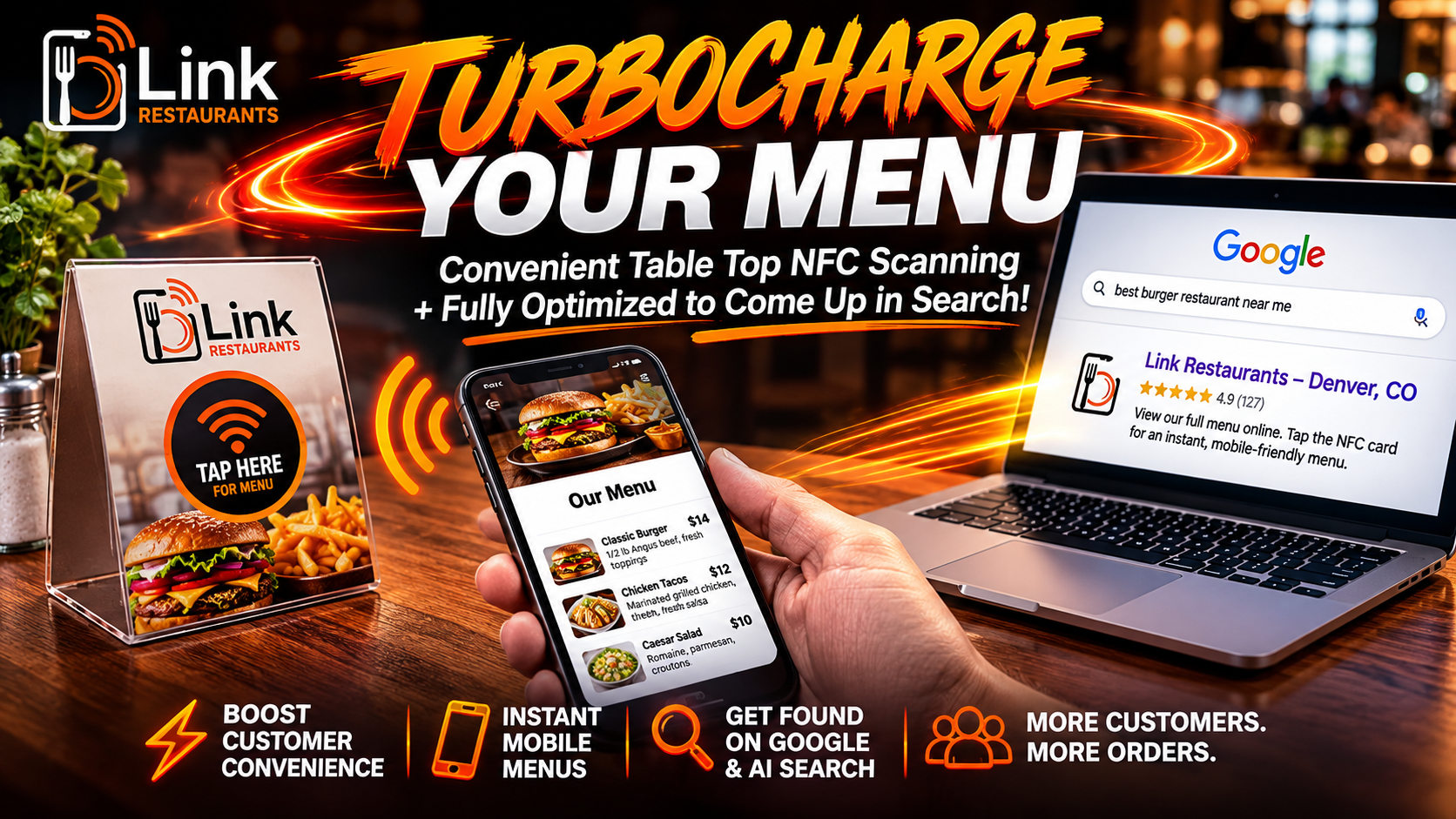
A printed menu lists your food. A Link Restaurants menu also gets you found. Guests tap a card and your menu opens instantly — and because every dish is real, readable text, Google and AI assistants can finally read what you serve.
Participating restaurants
Do you want a boring printed menu, or one built to fill your tables?
Both list the same food. Only one of them works for you when nobody is sitting down yet.
What does it mean to “turbocharge” a restaurant menu? It means turning your menu from a static list into a working piece of your marketing. Link Restaurants rebuilds your menu as a fast web page where every section, dish and price is real readable text, adds the structured data that tells search engines what kind of business you are and what you serve, gives it a clean address you can put everywhere, and programs an NFC card so guests open it with a single tap. The result is a menu that serves the guest at the table and helps the next guest find you before they leave the house.
Your best dish might be invisible
Not to the guest at table six. To everyone who has not walked in yet.
Picture the moment someone chooses where to eat. They are on a phone. They type a dish, a street, or just “food near me.” Or they ask an assistant out loud. Or — increasingly — they type a full sentence into ChatGPT and ask it to recommend somewhere good.
In every one of those moments, a machine is deciding which restaurants to mention. And a machine can only mention what it can read.
This is where photo menus and PDF menus quietly lose you customers. To a search engine, a photograph of your menu is a photograph. The conch fritters you are famous for, the price of your ribeye, the fact that you do gluten-free pasta — none of it counts, because none of it is text. You could be the best place in town for a dish and be completely absent from the answer when somebody searches for it.
It gets sharper with AI. A search results page gives you ten chances to be noticed. An AI answer usually names three to five places and stops. There is no second page to scroll to. You are either in that short list or the person never learns you exist.
The fix is not complicated. Your menu needs to be words on a web page instead of pixels in a picture, with the right structure behind it so machines know a dish is a dish and a price is a price. That is what we build. You send the menu you already have; we make it readable by everyone — guests, Google, and the assistants people now ask for dinner ideas.
One card instead of a lifetime of reprints
Printed menus are consumables. They get spilled on, dog-eared, and thrown away. Then prices change and the whole run gets replaced. Laminated menus last longer, but they are plastic, and they end up in the same place eventually.
A Link Restaurants setup replaces that cycle with one card that never expires. The card only holds a link, so the menu behind it can change a thousand times and the card keeps working. Guests read on a device they already carry, so there is nothing to hand out, wipe down, or reprint.
- No reprinting when a price or a dish changes
- No laminated plastic menus to replace each season
- Nothing passed hand to hand between tables
- One card per table, reused indefinitely
Guests notice this, too. Tapping a card instead of being handed a sticky laminated sheet reads as a place that pays attention — which is exactly the impression you want in the first thirty seconds.
Restaurant menus that open with a tap
Link Restaurants hosts clean, fast digital menus for restaurants, bars, and cafés. Diners tap a card and read the menu on their phone. Owners send us the menu once, and we handle the rest.
A menu used to be a printed sheet and a printing bill. Today it is the first thing most guests look at, and they look at it on a phone. More than seven in ten restaurant searches now happen on mobile. People arrive hungry, nearby, and ready to decide in about two minutes. If the menu is slow, blurry, or hidden inside a PDF, they move on to the next place.
Link Restaurants fixes that. Every menu we build is real web text, not a picture and not a PDF. It loads in under a second. It reads clearly on a small screen without pinching or zooming. It shows the current prices, because we keep it up to date for you. And because it is real text, it can be found — by Google, by voice assistants, and by the new AI tools people now ask for dinner ideas.
The tap itself is the easy part. We give each restaurant a programmed NFC card or sticker. A guest holds their phone near it and the menu opens on its own — the same gesture they already use to pay. For phones that do not read NFC, a printed QR code does the same job. Either way, there is nothing to download and nothing to figure out.
From your menu to their phone in four steps
You do one thing: send us the menu. We do the rest, and we check in with you before anything goes live.
Send your menu
Paste your full menu into our form — sections, items, prices, the works. Add your hours, contact details, and a short bio.
We build and optimize it
We turn it into a clean, fast menu page at linkrestaurants.com/your-name, with structured data so machines can read every dish. We confirm every detail before it publishes.
Tap the card to test
We program an NFC card or sticker that points to your menu, and ship it to you. Hold a phone near it and your menu opens.
Guests read & order
Put the card on tables, the bar, or the door. Link it from your Google profile and socials too. One place, always current.
Exactly what we optimize on your menu page
Most menu companies stop at “it works on a phone.” Here is the rest of the work, spelled out, so you know what you are getting.
What makes a digital menu findable on Google and AI search? Four things: the dishes must be real text rather than an image, the page must carry structured data describing the restaurant and its menu, it must load fast on a phone, and it must be linked consistently from the places search engines already trust — starting with your Google Business Profile. A digital menu missing any one of those is just a PDF with extra steps.
Every dish as real text
Sections, item names, descriptions and prices are set as web text with a proper heading structure. Forty dishes on your menu means forty phrases somebody could search for and find you.
Menu structured data
Behind the page we mark up Restaurant, Menu, MenuSection and MenuItem with prices and currency, plus your address, hours and cuisine. That is the language search engines read facts in.
Built to load instantly
No frameworks, no bloated builder, no tracking pile. A guest on patchy cell data still gets your menu in about a second, which is the difference between reading it and giving up.
One clean, permanent URL
Your menu lives at linkrestaurants.com/your-name. Short enough to say out loud, stable enough to print, and the same address on your Google profile, your website and every social bio.
Open to AI crawlers
Our robots file welcomes the assistants people actually ask — GPTBot, ClaudeBot, PerplexityBot, Google-Extended and others. Plenty of sites block them by accident. Yours will not.
Local signals that match
Your name, address, phone and hours are written the same way on your menu page as on your Google listing. Machines recommend businesses they are confident about, and consistency is how confidence is built.
None of this asks anything extra of you. You send the menu; the readable, findable version is simply how we build it. There is no upgrade tier for the optimization, because a menu that cannot be found is not finished.
A menu people can actually read
PDF menus and photo menus were never built for phones. Guests pinch, zoom, and squint. Search engines cannot read them. Restaurants that switch from a PDF to a real digital menu see far more people get all the way through it.
Every Link Restaurants menu is built as clean web text. It fits the screen. It is easy to scan. And when you change a price or add a dish, the update is live for everyone at once — no reprinting, no new QR code, no sticker to peel off.
- Reads clearly on any phone, no zooming
- Found by Google and AI search, unlike a PDF
- One update changes it everywhere instantly
The card does the work
NFC is the same technology behind tap-to-pay. A guest holds their phone near the card and the menu opens on its own — no camera, no scanning, no app. It is the fastest, most natural way to hand someone a menu, and it works the moment they sit down.
We program each card to point at your menu page. Because the card only holds a link, you can change the menu behind it as often as you like and the card never needs replacing. For older phones, the same card carries a QR code as a backup, so nobody is left out.
- Tap is faster than scanning a QR code
- Card never expires — only the menu behind it changes
- QR backup for phones without NFC
People do not search for “restaurant.” They search for dinner.
Think about how you look for food yourself. You rarely type “Italian restaurant.” You type the thing you are craving — “birria tacos near me,” “conch fritters San Pedro,” “gluten free pizza open now.” Those are dish-level searches, and they carry the highest intent of anything in the category. The person is not browsing. They are choosing.
Here is the part most owners have never considered: every dish on your menu is one of those searches. A menu with forty items is forty chances to be the answer. But only if the words exist as text on a page a search engine can read.
That is the whole argument for getting your menu out of a PDF. It is not about looking modern. It is about turning a list you already wrote into forty separate doors into your restaurant.
- Dish names and descriptions become searchable phrases
- Dietary notes let people filter you in instead of out
- Prices in the markup answer “how much is dinner there?”
When someone asks an AI where to eat, can it name you?
This is the question almost no restaurant owner has tested. It takes about thirty seconds to find out.
How do I get my restaurant mentioned by ChatGPT and AI search? AI assistants do not invent recommendations — they build them from sources they can read and trust. That means a complete Google Business Profile, a menu published as real text rather than a PDF or image, structured data that identifies your cuisine, hours and location, and consistent details wherever your restaurant is listed. Restaurants that have those things get named. Restaurants that do not are simply missing from the answer, and the person asking never learns they exist.
Try it yourself right now. Open ChatGPT, Gemini or Perplexity and ask it something a hungry traveller would ask: “What are the best places to eat in [your town]? Give me five, with what makes each one worth going to and roughly what it costs.” Read the answer carefully. Are you in it? Are the details right? Is it linking to anything of yours?
Most owners run that test once and get quiet for a second. Either they are missing entirely, or the assistant is confidently reciting hours from three years ago that it scraped off some directory nobody has updated.
Both problems have the same root cause: there is no clean, current, machine-readable source of truth about your restaurant anywhere on the internet. Your menu page is exactly that source of truth — if it is built properly. Dishes as text. Hours as data. Address written the same way everywhere. A stable URL that does not change every time your web guy redesigns something.
That is not a bonus feature we tack on. It is what the page is for. The tap is how the guest at the table reaches your menu; the optimization is how everyone else does.
A menu that works as hard as you do
The best digital menu is the one that gets out of the way. Here is what changes when your menu lives on Link Restaurants.
You stop paying to reprint. Prices move. Suppliers change. A dish sells out. With paper, every change means a new print run. With Link Restaurants, you tell us what changed and the menu updates for everyone at once. The card on the table stays exactly where it is.
You show up in more searches. When your menu is real text instead of a picture, search engines can read it. Someone searching for a dish you serve can find you. Voice assistants can answer questions about your hours. AI tools that people now ask for recommendations can point them your way. A PDF does none of that.
You look current. A clean, quick menu says the same thing a tidy dining room says: this place has its act together. A blurry photo of a laminated sheet says the opposite. First impressions happen on the phone now, often before anyone walks in.
You give guests one link for everything. The same menu page can hold your hours, your phone number, a directions button, and links to your social pages. Put it on the table, behind the bar, on the door, on your Google Business Profile, and in your Instagram bio. One address, always up to date.
You keep it simple. There is no dashboard to learn and no app for your staff to manage. You send the menu, we build it, and we keep it running. When something needs to change, you send a note and we handle it.
Turbocharge your menu for $99
No app. No PDF. No image menu. A fast, mobile-friendly menu page your customers open with one tap — optimized so search engines and AI assistants can read every dish. You paste your menu once; we build it, publish it, and hand you a card that opens it.
Search and AI optimization is included in every build, not sold as an upgrade. We reach out to confirm every detail before your menu goes live and before we program your NFC card. Nothing publishes until you approve it.
Tell us about your restaurant
Fill this out and we’ll reach out to confirm the details before your menu is published. Paste your full menu in the big box — that’s the important one.
Paper, PDF, QR, NFC — what actually works
Every menu format has a place. Here is where each one wins and where it quietly costs you customers.
Printed paper menus feel good in the hand and never need a phone. For a quiet fine-dining room, a well-made paper menu is still lovely. The trouble starts the moment a price changes or a dish sells out. Now you are reprinting, or crossing things out with a pen, or apologizing to a guest who ordered something you ran out of. Paper is slow to change, and in a busy place things change all the time. It also does nothing at all for anyone who has not walked through the door.
PDF menus seemed like the easy digital answer. Snap the paper menu, save it as a PDF, link it to a QR code, done. Except a PDF is built for printing, not for phones. Guests have to pinch and zoom to read it, the text is tiny, and it often opens in a clumsy viewer. Worse, search engines cannot read a PDF menu well, so all that text does nothing to help people find you. A photo of a menu has the same problem, only more so.
QR code menus that link to a real web page are a big step up. The menu fits the screen and updates without reprinting. The only catch is the scan itself: the guest has to pull out their phone, open the camera, aim it, wait for the link, and tap. In bright sun or a dark bar that can be fiddly. It works, but it is a few steps.
NFC menus remove those steps. The guest taps and the menu opens. It is the same motion they already use to pay for coffee, so it feels natural and takes about a second. That is why we lead with NFC and include a QR code as a backup. You get the fastest option for most guests and a fallback that covers everyone else.
And then there is the part the format alone does not solve. A QR code pointing at a fast web page is good. A QR code pointing at a fast web page that search engines can read, that carries menu structured data, that matches your Google listing detail for detail, and that has a permanent address you can print — that is a different thing entirely. Link Restaurants gives you the best of the digital side without the homework. You cook; we keep the menu sharp and findable.
Built for how real places serve
An NFC menu is not just for white-tablecloth dining rooms. It fits the way all kinds of places actually work.
Beach bars and grills. Sand, sun, and salt are hard on paper. A card at each table or a sticker on the bar means no soggy menus and no glare-blind scanning. Guests tap, read, and order a round while their toes are still in the sand. When the catch of the day changes, so does the menu — instantly. And a visitor searching “best beach bar” before their trip can find that menu from another country.
Cafés and coffee shops. Morning rushes move fast. A tap at the counter or on the table gets the menu in front of someone before they reach the front of the line, which means quicker decisions and shorter queues. Seasonal drinks go up and come down without a single reprint.
Bars and pubs. Low light is the enemy of QR scanning, and NFC does not care about light at all. A tap opens the drinks list, the specials, and the food menu in one place. Add a signature-cocktail section and guests find their favorite in seconds — and so does anyone searching for that cocktail by name.
Food trucks and pop-ups. When your location changes, a printed menu board is a hassle and a QR sticker can get lost. An NFC card on the window opens the same reliable menu everywhere you park. Update prices from anywhere and the card keeps working.
Full-service restaurants. Keep your beautiful printed dinner menu if you love it, and use the NFC menu for the things that move — daily specials, the wine-by-the-glass list, what is in season. Guests get the current details without you reprinting the whole thing every week, and the searchable version exists either way.
One simple package, no surprises
Here is exactly what happens after you send us your menu, and what lands in your hands.
Your own menu page. We build a clean, mobile-first page at linkrestaurants.com/your-name. It carries your name, a short bio, your hours, a tap-to-call button, a directions button, and links to your social pages — all above your menu. It loads in under a second and reads well on any phone.
A menu that reads and ranks. Your sections, items, and prices are set as real web text with menu structured data behind them. That means guests can read it easily and search engines and AI assistants can index and quote it. If you send photos, we place them so the page stays fast.
A programmed NFC card. We encode a card that points to your page and ship it ready to tap. It carries a QR code too, so every guest is covered. Put it on tables, the bar, the door, or a small stand — wherever people decide what to order.
A link for everything. The same web address works on your Google Business Profile, your website, and every social bio. One place to keep current instead of five.
Updates handled for you. When something changes, send us a note. A full menu rewrite is a flat $100. Small swaps are quoted and usually quick. Either way, the change is live for everyone the moment we make it.
And before any of it goes public, we reach out to confirm the details with you. Your page and your card only go live once you approve them. No guessing, no surprises, no charge until you say go.
Your menu is also your best advertising
A good digital menu does more than feed the guest at the table. It helps the next guest find you in the first place.
Think about how people decide where to eat now. They pull out a phone. They search for a dish, a neighborhood, or just “food near me.” They ask a voice assistant. More and more, they ask an AI tool to suggest a place. In every one of those moments, the words on your menu matter — but only if a machine can read them.
This is the quiet problem with photo menus and PDF menus. To a search engine, a picture of your menu is just a picture. The dishes you are known for, the prices, the specials — none of it counts, because none of it is readable text. You could have the best ceviche on the island and be invisible to someone searching for ceviche.
Link Restaurants menus are built as real text, with a clean address, proper headings, and structured data behind the scenes. That is the language search engines and AI tools understand. When someone searches for a dish you serve or looks up your hours, your menu can be the answer. When an assistant reads back where to eat tonight, a readable menu gives it something to say about you.
It also gives you one tidy link to spread everywhere. Add it to your Google Business Profile so your menu shows up right in the search result. Drop it in your Instagram and Facebook bios. Put it on your website. Every one of those links points to the same page, and that page is always current. You are not maintaining five different menus that slowly drift out of sync — you are maintaining one.
None of this asks anything extra of you. You send the menu; the readable, findable version is simply how we build it. The advertising benefit comes free with doing the menu right.
Where to put your card so guests use it
The menu only helps when guests notice it. A few simple placements make tapping the obvious thing to do.
On the table. This is the heart of it. A small card or stand where guests sit means the menu is right there the moment they arrive. A short line like “Tap for menu” is all the instruction anyone needs. People already know the gesture from paying, so they take to it quickly.
At the bar and the counter. A sticker on the bar top or a card by the register catches people while they wait. In a café that means a decision is half made before they order. In a bar it puts the drinks list and specials one tap away, even in low light where scanning struggles.
On the door and the window. A card at the entrance lets someone read the menu before they even sit down — or decide to come in when they are walking past. For a food truck, the window is the whole storefront, and a tap there is the fastest way to show what you serve.
On the receipt and the takeaway bag. A tap point where the meal ends is a gentle nudge to come back. Guests can save the link, share it with a friend, or order again next time without hunting for you online.
Everywhere your name already lives. The card is physical, but the link behind it is not. Put that same link on your Google profile, your website, and your socials. A guest who found you online gets the exact same fast, current menu as the guest sitting at table six.
The goal is simple: make reading the menu the easy, obvious thing to do, wherever a guest happens to be. Tap, open, order. That is the whole idea, and a little thought about placement is what makes it click.
Everything you might be wondering
Thirty straight answers about NFC menus, search visibility, pricing, and how Link Restaurants works.
What is Link Restaurants?
What does “turbocharge your menu” actually mean?
What is an NFC menu?
How is this different from a QR code menu?
How is this different from other digital menu companies?
Do my customers need to download an app?
How much does it cost?
What does the $99 setup include?
Is the search optimization extra?
Why is there a fee for menu updates?
Can I update the menu myself?
How fast do updates go live?
Will my menu show up on Google?
Does an NFC menu help me show up in ChatGPT and AI search?
Will people find my individual dishes in search?
Does it work with voice assistants?
Is a digital menu better for the environment?
Do I still need paper menus?
Where do I put the NFC card?
What if a guest’s phone doesn’t support NFC?
Can I use my own web address?
Do you review my menu before it goes live?
How do I send you my menu?
What kinds of places is this for?
Can I add photos of my dishes?
Does the NFC card need batteries or charging?
Should I link my menu from my Google Business Profile?
Can my menu show allergens and dietary information?
Is there a contract or can I cancel?
How do I get started?
Ready to turbocharge your menu?
Send us your menu and we’ll build your page, optimize it for search and AI, program your card, and confirm every detail before it goes live.
Add your restaurant